How to add a graphic file to a field via API
Learn the practical steps for adding graphics to records in YetiForce via API – the article explains the required parameters and shows a specific implementation example.
Before continuing, please research the methods and ways of communication described here: https://doc.yetiforce.com/api/
The YetiForce application has two types of fields that support graphic files:
- Image file
- Image files (many)

Adding an image
To add an image file to a record, use the standard endpoint for creating or editing a record via the POST (create) or PUT (edit) method.
/webservice/WebserviceStandard/{moduleName}/Record
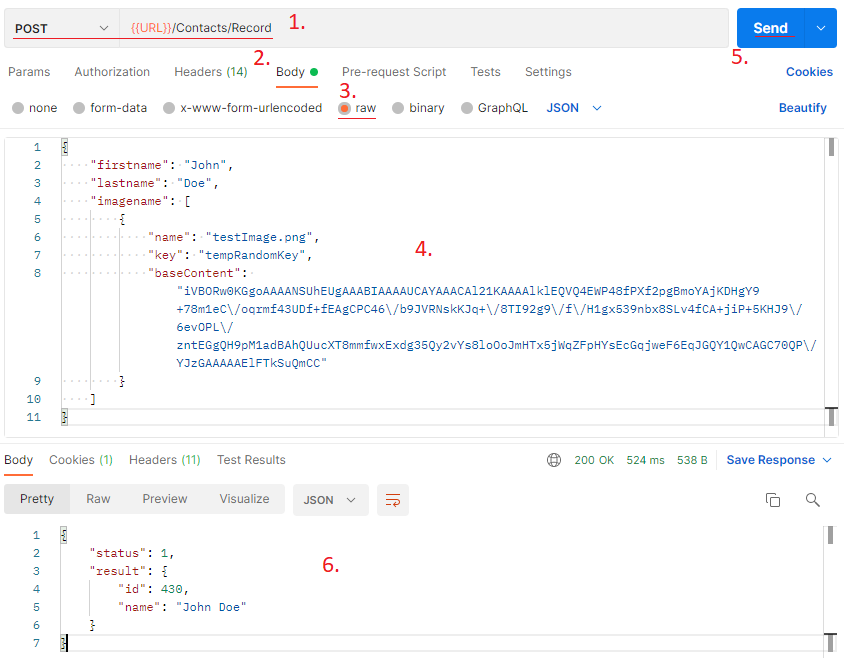
The file field is added similarly to other record fields, with the difference that its value is not a text string or number, but an array of objects. An image file object created via the API requires three elements:
-
name- file name. -
key- a random string of characters, unique within the graphic files of a given field. -
baseContent- an image file converted to base64 format. Do not include the fragment with the MIME type (e.g.data:image/jpeg;base64,).
Below is an example of adding an image file to a contact using Postman, where imagename is the field name specified in the module settings.